Download
Download StarkLLM
Get started with the Windows Research Beta.
Release package
- Versionv2.0.0 (Native Desktop)
- LicenseApache 2.0 (open source)
- Installer size82.3 MB (82,251,796 bytes)
- Portable app size81.9 MB (81,931,492 bytes)
SHA-256 checksums
To verify file integrity before you run it, compare the SHA-256 hash of your download:
e6b29e6b77788dfd85eaa1e3e96634f38c97f1d4ed993b6ff6057340d4a457b5a0c8b569d554ee345802f832ece80fad01f4db378c126576ac6685be78aaeda9Verify in PowerShell: Get-FileHash -Algorithm SHA256 StarkLLM-v2.0.0-Setup.exe
Setup steps
If Docker, Ollama and the models are already installed, setup takes about 5 minutes. First-time model and Docker image downloads depend on your bandwidth.
- Start Docker DesktopMake sure Docker Desktop is running in your system tray.
- Install Ollama and pull the modelsIn a terminal, run:
ollama pull qwen2.5:7b
ollama pull nomic-embed-text
For 8 GB RAM laptops use ollama pull qwen2.5:3b. For power workstations use ollama pull qwen2.5:14b. - Run the StarkLLM installerDownload and run StarkLLM-v2.0.0-Setup.exe, or use the zero-install portable executable. The installer creates desktop shortcuts.
- Launch the desktop appClick the StarkLLM desktop shortcut. Local services initialize and StarkLLM opens in its own standalone application window, with no browser tabs or URL bar.
Prerequisites checklist
Before you start StarkLLM, confirm that all of the following are in place:
- OS: Windows 10 or 11 with WSL2 enabled.
- Docker Desktop: Installed and running (visible in the system tray). Without it, containers cannot start.
- Ollama: Installed natively on Windows and running. Download from ollama.com.
- Recommended models: In a terminal: ollama pull qwen2.5:7b and ollama pull nomic-embed-text.
- Hardware: Minimum 8 GB RAM (3B models), 16 GB recommended (7B models). An NVIDIA GPU with 8 GB+ VRAM is strongly recommended. The manual has hardware tier guidance.
- Supported formats: PDF, DOCX, TXT, Markdown (.md), CSV, JSON, HTML and images (PNG, JPG with OCR).
Windows SmartScreen and execution notice
Files downloaded from the web carry a Mark of the Web (MOTW) flag. When you run start.exe, click More info, then Run anyway, or run unblock.ps1 in PowerShell to clear the flag locally.
Alternative launch options
These apply to the portable folder or ZIP that includes the launcher scripts.
Option A: run start.exe from a terminal
start.exe is a standalone launcher. It checks Docker Desktop and Ollama, builds containers and opens your browser.
- In File Explorer inside the extracted folder, click the address bar, type cmd and press Enter.
- Type start.exe and press Enter. If SmartScreen warns you, click More info, then Run anyway.
Option B: run start.cmd
To run a command script directly, open a terminal in the extracted folder and run start.cmd (in PowerShell: .\start.cmd).
Option C: Docker Compose directly
To use the standard Docker CLI:
docker compose up --build -d
Option D: run unblock.ps1
If execution policies block scripts, open PowerShell in the extracted folder and run:
powershell -ExecutionPolicy Bypass -File unblock.ps1
This removes SmartScreen flags only from files inside the current StarkLLM folder. It does not change your global Windows security settings. Afterwards, run start.exe or start.cmd.
Important notes
StarkLLM is free and open source (Apache 2.0).
Licensed under Apache 2.0, free for personal, research and commercial use.
Provided "as-is" without warranty or liability of any kind.
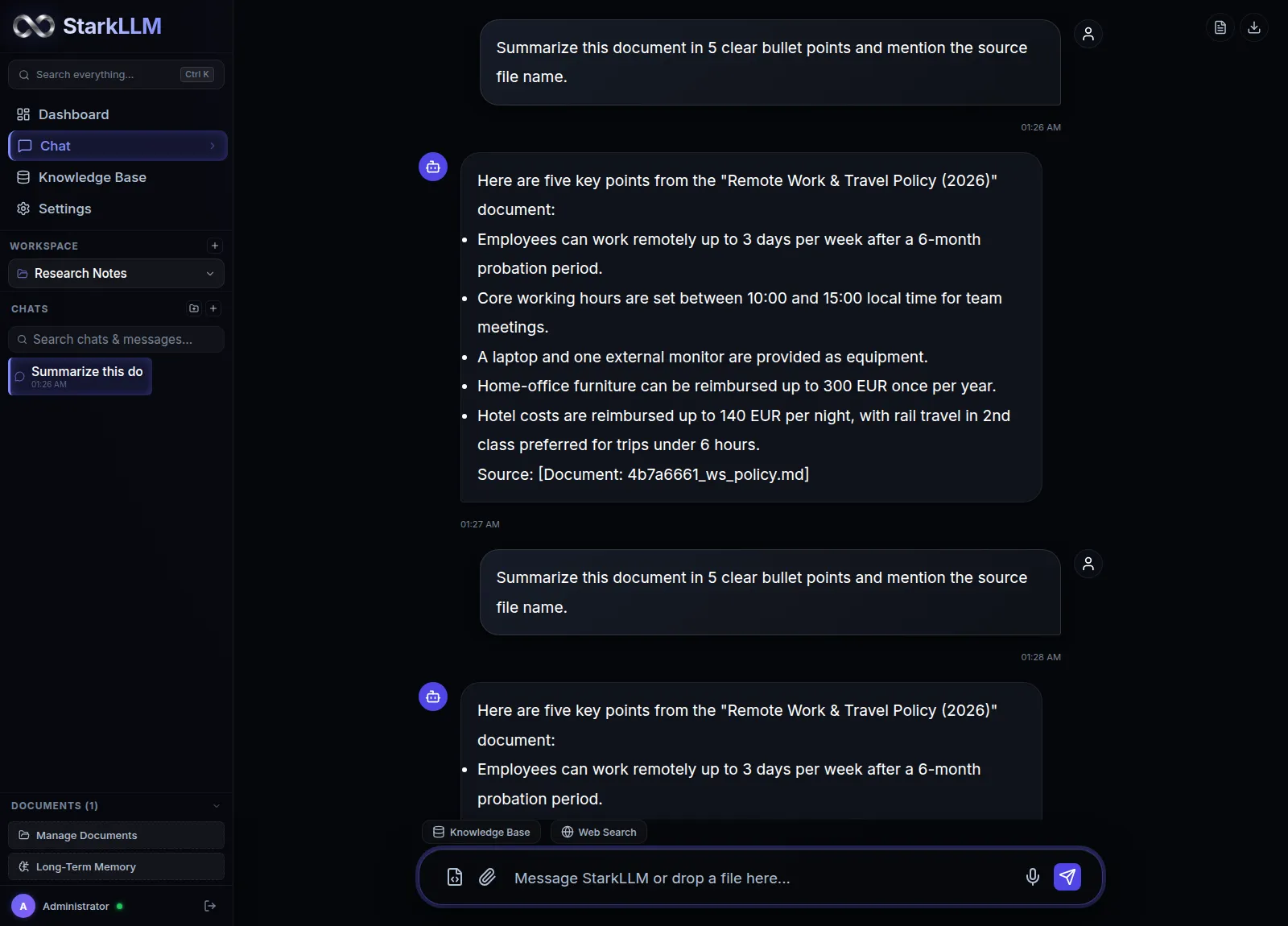
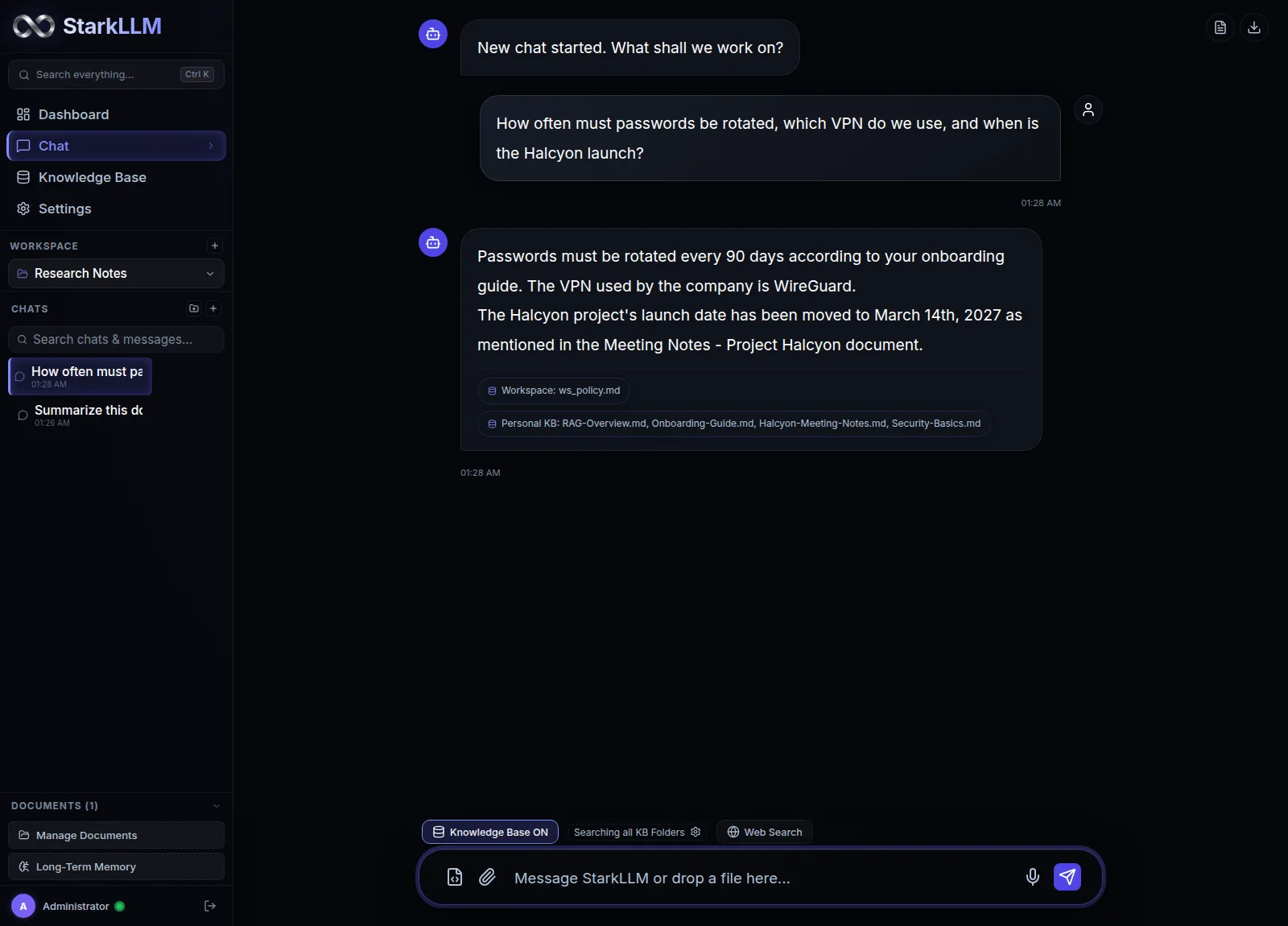
Application walkthrough
A step-by-step look at what to expect when you run StarkLLM on your machine.
============================================
          StarkLLM Control Panel
          Windows Research Beta
============================================
 1.  Start StarkLLM
 2.  Stop  StarkLLM
 3.  Exit
Enter choice [1/2/3]: 1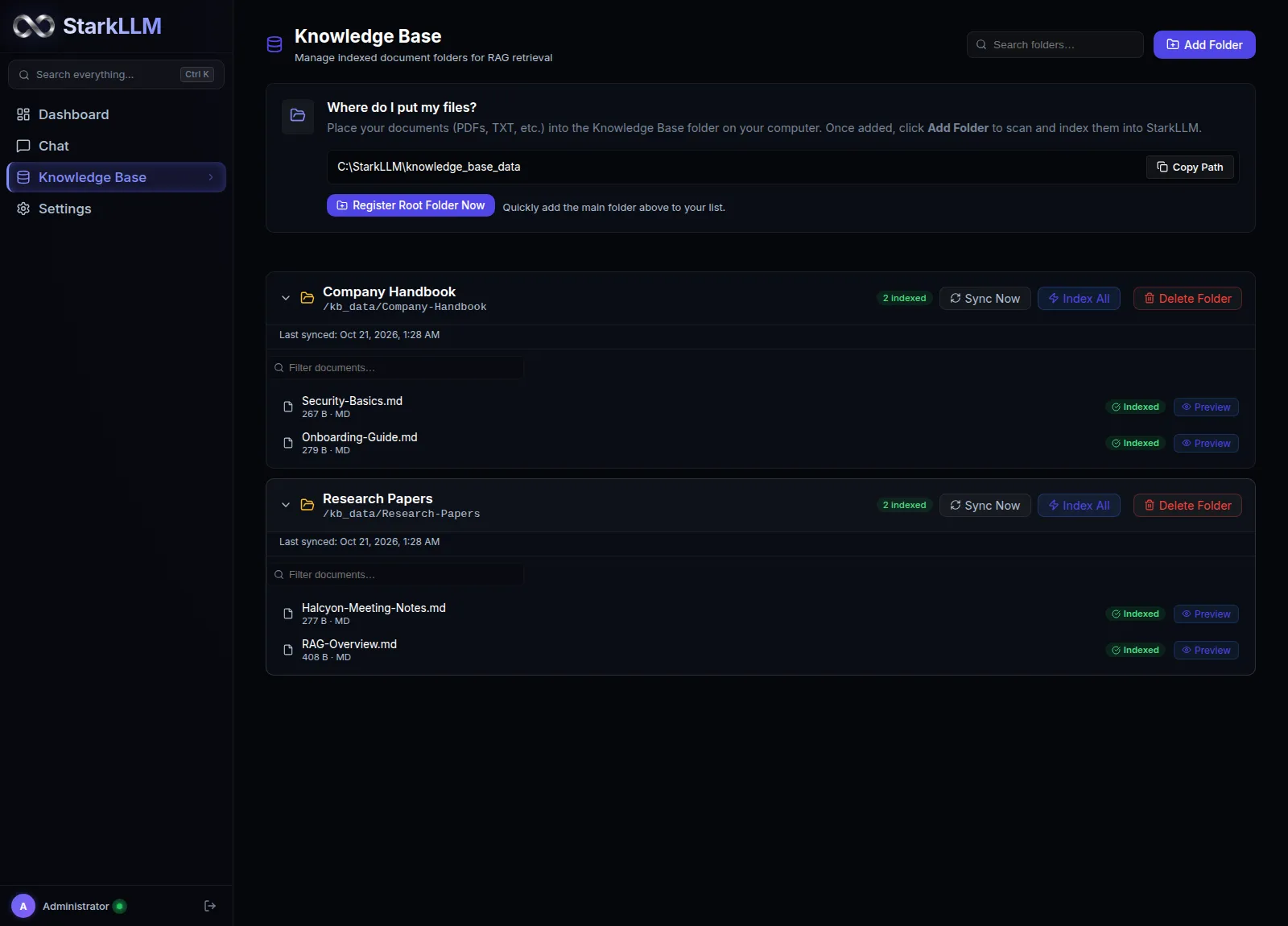
tool_call: search_local_kb
// Human approval gate
{
  "query": "security policy",
  "top_k": 3
}
Approved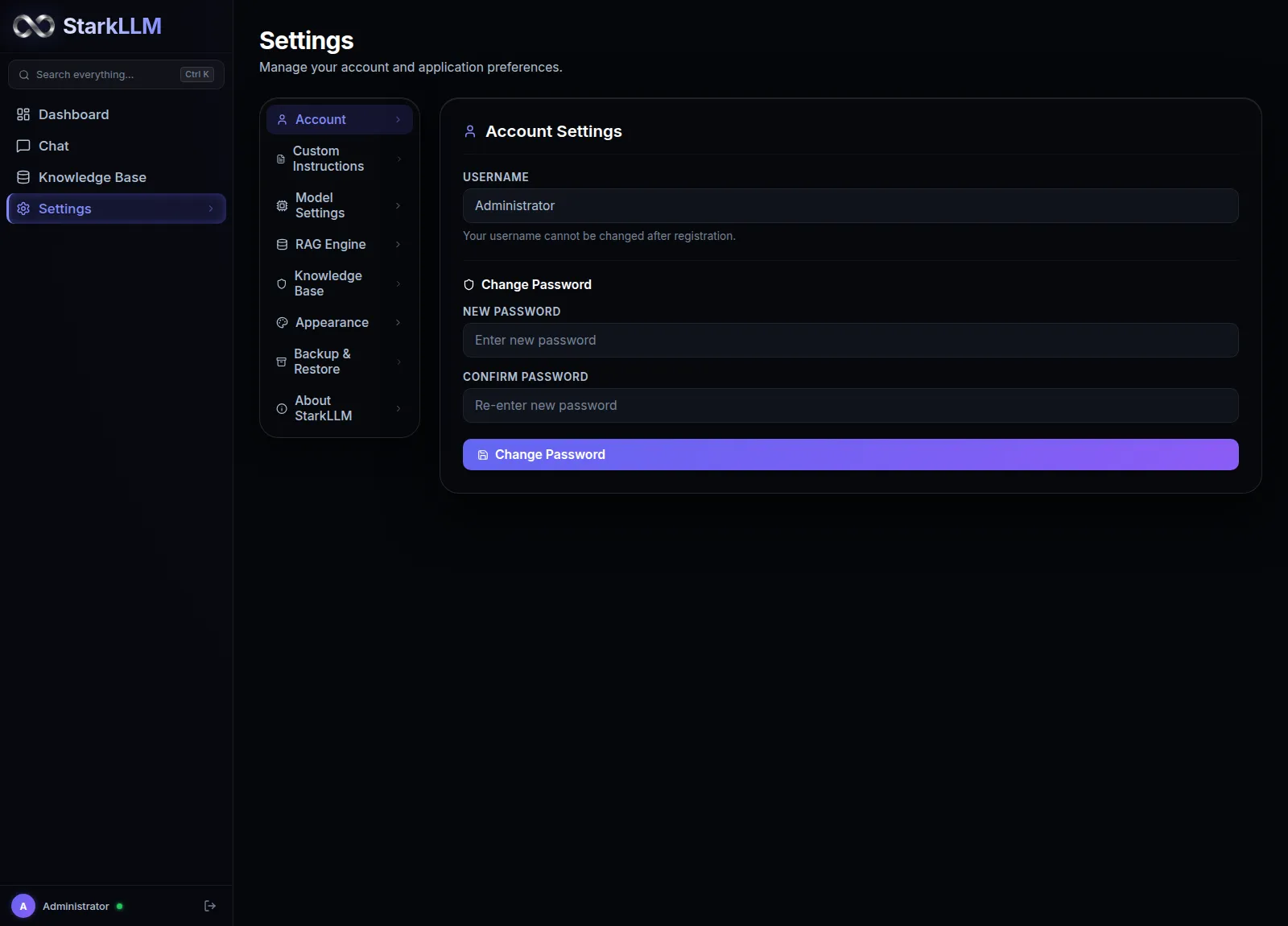
Frequently asked questions
Does my data leave my computer?
StarkLLM is designed to keep your data on your machine. Documents are stored in a local ChromaDB container, and AI inference runs through Ollama on your host. During normal local operation, no data is transmitted externally.
Is StarkLLM free?
Yes. It is free and open source under Apache 2.0 for personal, research and commercial use. No subscriptions, telemetry or hidden tiers. Provided "as is" with no warranty.
Why can answers be slow?
Speed depends on your hardware. Without a dedicated GPU, Ollama falls back to CPU inference, which is much slower. A dedicated NVIDIA GPU with 8 GB+ VRAM generates much faster.
Why does Windows SmartScreen warn about downloaded launchers?
Windows attaches a Mark of the Web attribute to files downloaded from the internet. When you run start.exe, click More info, then Run anyway. Alternatively run start.cmd from a terminal, or run unblock.ps1 to remove the flag locally.
What hardware do I need?
Minimum 8 GB RAM for 3B models, 16 GB RAM for 7B models. For power-user models (14B to 32B), 24 GB VRAM or 64 GB system RAM is recommended.
What is the difference between normal chat and document chat?
Normal chat relies only on the model's pre-trained knowledge. Document chat uses RAG: it searches your uploaded documents first, feeds the relevant chunks to the model, and answers with verifiable citations.
What is the difference between workspace documents and the Knowledge Base?
Workspace documents are isolated to one project. The Knowledge Base is a persistent, global folder on your machine that any chat can reference.
What if the app opens but chat does not connect?
Make sure Docker Desktop and Ollama are running, and that you pulled the default models (ollama pull qwen2.5:7b and ollama pull nomic-embed-text). The backend container talks to Ollama on your host via host.docker.internal:11434. If needed, restart the containers with docker compose down, then docker compose up --build -d.
Can I inspect the source code?
Yes. StarkLLM is fully open source on GitHub at homomorphicprivacy/StarkLLM under the Apache 2.0 license.
Where can I send feedback or contribute?
We welcome feedback. Email info@starkllm.com or open an issue on the GitHub repository.
Contribute and suggest improvements
StarkLLM is an open, evolving project. If you hit a bug, have a feature idea or want to inspect the source:
Browse the source, inspect the launchers and open issues.